
TOC
Move your Joomla articles, categories, menus, and SEO to WordPress with the FG importer, without losing content or rankings.
- The free FG Joomla to WordPress plugin connects directly to your Joomla database and migrates articles, categories, tags, images, and internal links in a single pass — no export file required.
- Joomla sections become WordPress categories, categories become sub-categories, and articles import as posts or pages depending on your choice at import time — but Joomla templates and extensions do not migrate and must be rebuilt.
- The free version skips meta descriptions and 301 redirects entirely; if you have any SEO value worth keeping, budget for the Premium add-on (around €49.99) on day one rather than scrambling to rebuild redirects after cutover.
- Confirm the Joomla table prefix in your settings matches the one in configuration.php before running the import — a wrong prefix is the number-one reason the importer comes up empty.
- The FG importer has been tested with Joomla 1.5 through 6.0 and on databases holding tens of thousands of articles, so scale is not the limiting factor — the work that takes time is the design rebuild and redirect mapping.
Joomla to WordPress migration, in one paragraph
Here’s the part nobody tells you up front. Of all the platforms I’ve moved clients off of, Joomla is one of the friendlier ones. I’ve done a handful of these over the years, and unlike Wix or Squarespace it doesn’t actively fight you. It’s a real CMS sitting on a real database, so your articles, categories, images, users, and menus come out the other side intact. The usual route is the free FG Joomla to WordPress importer. It connects straight to your Joomla database and pulls everything in one pass. A paid add-on then carries over menus, users with their passwords, SEO metadata, and 301 redirects so your rankings survive the move.
I’ll be honest about the catch, though. “Friendlier” is not the same as “hands-off.” Every Joomla install I’ve touched has been its own little snowflake. One client ran a stack of third-party extensions for their article layouts. Another had been upgraded across three major Joomla versions and carried the scar tissue to prove it. The FG importer is genuinely good software, but it assumes a tidy database underneath, and tidy is rarely what you inherit. So there’s always cleanup. There’s always a quirk that bites you on the first dry run.
Below I’ll walk the whole thing. What the importer actually handles, how Joomla’s structure lands in WordPress, the exact import steps, and the SEO work that keeps Google calm on the way over. Don’t want to touch a database connection at all? jbe.works runs a managed WordPress migration service and handles the import, the redirects, and the QA for you.
Why move from Joomla to WordPress
Nobody leaves a platform that’s working for them. The teams I talk to are usually chasing one or two of the same things, and Joomla just isn’t giving them anymore.
A bigger ecosystem
WordPress powers a large majority of all CMS-based sites. Practically, that’s a far deeper pool of themes, plugins, tutorials, and developers than Joomla can match. Whatever you’re trying to build, the odds are good someone already shipped a plugin for it.
Easier content management
The article-and-section model in Joomla is powerful, but the learning curve is real. WordPress is friendlier for the people who actually write your content day to day, especially with the block editor. Lower friction on every update adds up fast.
Lower maintenance friction
Try finding an affordable Joomla developer in 2026. It gets harder every year. WordPress talent, by contrast, is everywhere and competitive on price, so maintenance, security patches, and new features cost less and ship faster.
Room to grow
And you’re not boxing yourself in. WordPress scales from a tiny brochure site up to enterprise publishing, and it can even run headless with a Next.js frontend once you outgrow the traditional theme model.
The FG Joomla to WordPress importer: what it migrates
The free FG Joomla to WordPress plugin is the de facto standard for this move. It has 7,000+ active installations and a 4.7-star rating on WordPress.org, and it works by connecting straight to your Joomla database rather than relying on an export file.
What the free version migrates
- Joomla sections as categories and categories as sub-categories
- Articles (published, unpublished, and archived) as posts or pages
- Images and media, uploaded into WordPress’s
uploadsdirectories - Tags (and Joomla meta keywords imported as tags)
- Web links and internal link rewriting so content still points to the right place
- Featured image set to the first image in each article, with alt text and captions preserved
The plugin has been tested with Joomla versions 1.5 through 6.0 and on very large databases, so it scales to sites with tens of thousands of articles.
What the importer can’t do is decide how your old structure should land in WordPress. That call is yours, and it’s where the real work hides. I learned that lesson the hard way on a migration where a network of legacy blogs had to land on a single enterprise WordPress platform. The brutal part wasn’t volume. It was that no two of those publications ran the same legacy software. One blog had grown up on one CMS, the next on something else entirely, a few on home-grown setups nobody had documented. So there was no single import recipe. Each one demanded its own reconciliation pass before a single article moved, figuring out how that particular system had stored its categories, its authors, its dates, then deciding how all of it should map into a shared WordPress structure that still made editorial sense. The tool moves the rows. You’re the one who reconciles the meaning across sources that were never designed to agree. Joomla is kinder than that because its sections and categories stay consistent within a single site. Even so, look hard at what you’ve actually inherited before you trust any default.
What the Premium add-on adds
The Premium version runs around €49.99, and it’s where the SEO-critical pieces live. Your navigation menus come across as proper WordPress menus. Authors and users migrate with their passwords intact. Meta descriptions and meta keywords carry over. You get 301 redirects from the old Joomla URLs, or you can keep the original Joomla article IDs instead. Custom fields (Joomla 3.7+) and Joomla 2.5+ featured images come too. It even handles older Joomla 1.0 / Mambo sites and a long list of third-party add-ons like K2, EasyBlog, Virtuemart, and Kunena.
Got any SEO value worth keeping? Budget for Premium. The free version skips meta descriptions and skips redirects, and those two things are exactly what protect your rankings. Fifty euros is nothing next to the traffic you’d bleed rebuilding redirects by hand after the fact.
How Joomla content maps to WordPress
Every CMS I’ve migrated off of hoards content its own way. Wix buries it behind a closed editor. Drupal nests it deep in entities. Joomla, mercifully, keeps it in a clean relational structure. That’s why I never reuse one migration’s plan on the next. With Joomla the mapping is mostly predictable, which is a gift, but you still want it in your head before you import rather than after.
| Joomla concept | WordPress equivalent | Notes |
|---|---|---|
| Section (legacy) | Category | Top-level Joomla sections become categories |
| Category | Sub-category | Joomla categories nest under the old section |
| Article | Post (or Page) | You choose posts or pages at import time |
| Static / uncategorized article | Page | Best mapped to a WordPress page |
| Tags | Tags | Including meta keywords imported as tags |
| Menu (Premium) | WordPress menu | Rebuilt as nav menus |
| Users (Premium) | Users | Passwords preserved |
| Templates / extensions | Theme / plugins | No transfer; rebuilt in WordPress |
The last row is the one people underestimate. Joomla templates and extensions do not migrate. None of them. Your design and any extension-driven features get rebuilt from scratch with a WordPress theme and plugins, and that’s work the content import doesn’t touch. Scope it as its own line item. In my experience it’s often the bigger half of the whole job.
Prepare before you run the importer
Five minutes of prep saves you hours of cleanup. Don’t skip these.
Back up both sites
Back up your Joomla database and files first. Then snapshot the fresh WordPress install too. The FG importer reads from Joomla but writes to WordPress, so a rollback point on each end is cheap insurance against a bad run.
Get your Joomla database credentials
Because the importer talks to the Joomla database directly, you’ll need the host, database name, username, password, and the table prefix. All of it lives in Joomla’s configuration.php. Have it open before you start.
Inventory your URLs
Crawl your live Joomla site and export every single URL. That export becomes your redirect map and your post-launch QA checklist. Grab your current rankings and traffic while you’re at it, so afterward you can prove the migration was clean. A quick free pre-migration audit hands you that baseline.
Install WordPress on staging
Build your clean WordPress on staging, never on the live domain. Import there, verify there, and only then go live. If the underlying fundamentals like staging, search-replace, and DNS are new to you, read the complete WordPress migration guide first.
How to migrate Joomla to WordPress, step by step
Here’s the full FG importer workflow, start to finish, from a clean WordPress install to a live and redirected site.
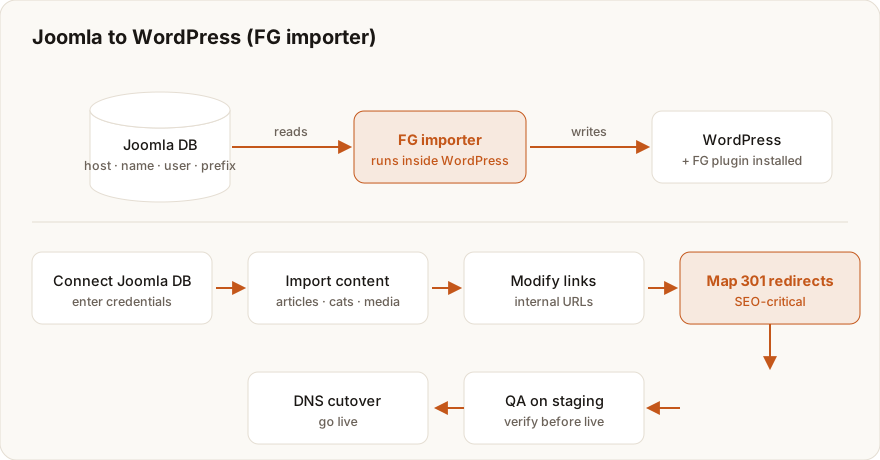
1. Install WordPress and the FG importer
On your staging WordPress, grab the FG Joomla to WordPress plugin from the plugin directory and activate it. Open it from Tools > Import > Joomla (FG).
2. Connect to your Joomla database
Punch in your Joomla database host, name, username, password, and table prefix. Now hit the plugin’s Test the database connection button. Confirm it can actually read your Joomla data before you go a step further.
3. Configure import behavior
Decide whether your articles import as posts or pages, whether external media gets downloaded, and how images are handled. On Premium, this is also where you switch on the menu, user, SEO metadata, and redirect options.
4. Run the import
Click Import content from Joomla to WordPress and let it work. The plugin scans your Joomla database and pulls in articles, categories, tags, and media. Big sites run this in batches. Walk away and let it finish completely.
5. Modify internal links and finish media
Run the plugin’s Modify internal links step so old Joomla links resolve to their new WordPress URLs. Then double-check that images landed in the media library with their alt text intact.
6. Set up 301 redirects
Premium users, turn on Joomla-URL redirects here (or keep the original article IDs). On the free version you’ll build the map by hand with a redirect plugin, pointing every old Joomla URL at its new WordPress equivalent. Tedious, but non-negotiable.
7. Rebuild design and navigation
Apply your WordPress theme, rebuild the menus (or verify the migrated ones), and recreate any extension-driven features with WordPress plugins.
8. QA on staging, then go live
Walk through posts, categories, images, internal links, and redirects one more time. Once it all passes, point DNS at WordPress, verify SSL, and submit a fresh sitemap in Google Search Console.
Preserving SEO and rankings after migration
A flawless content import means nothing if Google can’t find your pages where it left them. So protect your search visibility on purpose, not by accident. Here’s where I focus.
First, map every URL. Joomla’s default URLs carry article IDs, and those look nothing like WordPress’s pretty permalinks. You either keep the Joomla IDs (a Premium option) or 301-redirect each old URL to its new slug. There’s no third option that keeps your rankings.
Carry the metadata over too. Meta descriptions and titles tell search engines this is the same site that moved, not some brand-new domain that appeared overnight. And use 301s, not 302s. Permanent redirects pass link equity. Temporary ones quietly don’t, which is a mistake I’ve seen sink otherwise clean migrations.
Once you’re live, install an SEO plugin like Yoast or Rank Math to manage titles, descriptions, and your sitemap going forward. Then resubmit that sitemap in Google Search Console the moment you launch, and keep an eye on crawl errors for a few weeks after.
The cleanest migrations are the ones search engines never notice. Same content, same URLs (or proper redirects), just a faster and far easier platform underneath.
Honestly, this is where most DIY moves stall. If preserving rankings on a content-heavy Joomla site feels like a gamble, that’s exactly the core of jbe.works’ WordPress migration service. Full URL mapping, metadata carry-over, and post-launch monitoring, handled.
Common Joomla migration pitfalls
A few snags catch almost everyone the first time around. None are fatal once you know to watch for them.
The classic is a wrong database prefix. When the importer comes up empty, nine times out of ten the table prefix in your settings doesn’t match the one in Joomla’s configuration.php. Then there’s skipping redirects, which is the real ranking killer. Joomla and WordPress format URLs differently, so without a redirect map every old link returns a 404 and your equity evaporates.
People also expect their templates to transfer. They won’t. Joomla templates and most extensions have no WordPress equivalent, and the design gets rebuilt either way. Broken images are common too. If the media didn’t download, re-run the import’s media step or flip on external-media download and try again. One Joomla site I migrated stored half its images through a gallery extension the FG importer didn’t recognize. The articles came in fine. The photos didn’t. I ended up writing a small cleanup pass to pull those files and re-attach them, which is the kind of thing you only find out about by running the import and watching what breaks.
On big sites, watch for import timeouts. A large database often wants higher PHP memory and execution limits. The importer batches the work, sure, but the server still has to keep pace. And the cardinal sin? Not testing on staging. Verify everything before cutover. Never, ever debug on the live domain.
For a deeper troubleshooting reference covering 404s, 500 errors, database connection failures, and missing images, see common WordPress migration errors and how to fix them. And if you’re weighing other platform moves, the FG-importer approach here closely mirrors the one in the Drupal to WordPress migration guide.
Your next step
So where does that leave you? In a good spot, frankly. As platform moves go this is one of the cleaner ones. The FG importer pulls your articles, categories, and media straight from the Joomla database, and Premium fills in the menus, users, metadata, and redirects that keep your SEO whole. Map your URLs, rebuild the design, verify on staging, then cut over.
Rather not deal with database credentials and redirect maps at all? jbe.works delivers done-for-you WordPress migration with SEO preservation and a zero-downtime cutover baked in. Start with a free pre-migration audit to benchmark your Joomla site, then hand the rest to a specialist.
Frequently asked questions
Planning a migration and want it done without losing rankings?
Redirect maps, an SEO-safe cutover and post-launch checks, handled start to finish.
WordPress Migration Service →Is your site costing you customers?
Enter your website and get a free 60-second performance, SEO & accessibility report.
~60 seconds · No login