
TOC
A hands-on comparison of the seven WordPress migration plugins worth using in 2026. Free versus paid, real size limits, ease of use, and exactly which one fits your move.
- For most small sites All-in-One WP Migration’s two-click export-and-import is the fastest path; for large sites Migrate Guru runs the transfer on remote servers and handles up to 200 GB completely free.
- Server-bound plugins (All-in-One WP Migration, Duplicator free) can time out on big sites because the heavy lifting happens on your own server — Migrate Guru’s off-server approach eliminates that class of failure entirely.
- Duplicator’s portable installer.php deploys a site into an empty directory with no WordPress pre-installed, making it the go-to for local-to-live pushes and developer-controlled deploys.
- WP Migrate unserializes data before running a find-and-replace then re-serializes it correctly, which makes it the right tool for developers who shuttle databases between local, staging, and production environments.
- A migration plugin moves whatever content you already have — if that content is trapped inside a page builder’s shortcodes or a proprietary structure, the plugin faithfully ports the mess, not clean portable WordPress.
The best WordPress migration plugin, in one paragraph
There is no single best WordPress migration plugin, and anyone who tells you otherwise is selling something. For a large site where you cannot risk server strain, Migrate Guru. For the simplest export-and-import on a small site, All-in-One WP Migration. Developers who need database-only push and pull want WP Migrate. And if you want a downloadable archive you can deploy anywhere by hand, Duplicator is the long-standing standard. Which one fits comes down to your site size, your host, and how comfortable you are touching files over FTP. I have run most of these in real client work, and I will be straight with you. The plugin is rarely the hard part. This guide tests the seven that actually matter and points you to the one that fits your move.
One thing colors how I rate every tool below. On a migration where a network of legacy blogs had to land on a single enterprise WordPress platform, not one of them was a plugin job. Each title ran different legacy software, so the content came in shaped a dozen different ways, and the platform held every one of them to a standard a plugin cannot meet on its own. After that, plus a building-materials store with roughly 2,000 products fused to Divi that I had to pry loose by hand, I stopped seeing these plugins as the answer to migration. They are the answer to clean migration. There is a difference, and I will keep coming back to it.
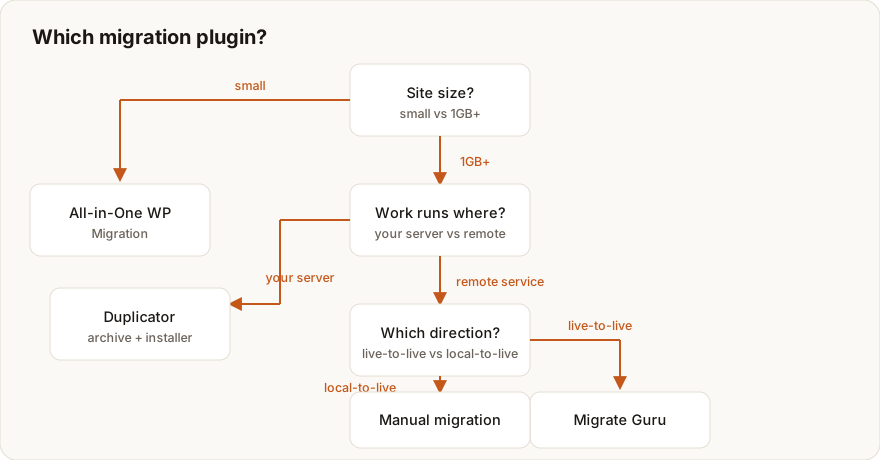
Get one thing straight before you do anything else. Match the plugin to your site size first. Sites over roughly 512 MB slam into the free upload ceiling on most importers, and that one constraint quietly knocks out half the field before you have even started.
If you would rather not run any of this yourself, a managed WordPress migration moves the whole site, database, media, redirects, and DNS, with zero downtime and a tested rollback. Either way, start with the comparison below.
How to choose a WordPress migration plugin
Strip away the marketing and every one of these plugins does the same fundamental job. It copies your database, media library, themes, and plugins from the old site to the new one, then rewrites the URLs so the destination actually works. What separates them is how they move the data and where the heavy lifting happens.
The four questions that decide it
- How big is your site? The full export (database plus
wp-content) determines whether you will hit upload limits. Check it in your host’s file manager before choosing. - Where does the work run? Plugins that process on your own server (All-in-One WP Migration, Duplicator) can time out on shared hosting. Plugins that process on remote servers (Migrate Guru) never touch your site’s resources.
- Do you need files or a transfer? Some tools give you a downloadable archive to install anywhere. Others push directly server to server.
- Free or paid? Every tool here has a capable free tier. You pay for size limits, automation, cloud storage, and multisite.
There is a fifth question the marketing pages never ask, and in my experience it settles more migrations than the other four put together. How cleanly is your content stored to begin with? A site welded tightly inside a page builder does not export the way a clean WordPress install does, and nothing on this list fixes that for you. Hold that thought. It is the whole line between “pick a plugin” and “this one needs custom work,” and I come back to it at the end.
Before you migrate anything, it pays to know what you are actually moving. Run a free pre-migration audit to size the site, flag broken links, and surface performance issues you can fix during the move rather than after. For the full process around the tooling, read the complete WordPress migration guide.
WordPress migration plugins compared at a glance
The table below summarizes the seven WordPress migration tools covered in this guide. “Size limit” refers to the practical free-tier ceiling for importing or transferring a full site. “Where it runs” tells you whether the migration consumes your own server resources.
| Plugin | Free tier | Paid from | Practical size limit (free) | Where it runs | Ease | Best for |
|---|---|---|---|---|---|---|
| All-in-One WP Migration | Yes | $69/yr (Unlimited) | ~512 MB import (server-bound) | Your server | Easiest | Small sites, non-technical users |
| Duplicator | Yes (Lite) | $49.50/yr | Bound by server timeout/memory | Your server | Moderate | Manual deploys, local-to-live |
| Migrate Guru | Yes (fully free) | Free | Up to 200 GB | Remote (BlogVault servers) | Easy | Large sites, host-to-host moves |
| UpdraftPlus | Yes | ~$70/yr (Personal) | Chunked; server-dependent | Your server | Moderate | Backup + occasional migration |
| WP Migrate (Lite) | Yes (Lite) | $49/yr | DB export; full-site export in Lite | Your server | Developer-oriented | DB push/pull, dev workflows |
| Jetpack VaultPress Backup | No (paid only) | ~$9.95/mo (billed yearly) | Cloud-stored, 10 GB+ storage | Remote (Jetpack cloud) | Easy | Backup-first restores to new host |
| Host migrators (Bluehost/SiteGround) | Yes (host-tied) | Free with hosting | Host-dependent | Host infrastructure | Easy | Moving TO that specific host |
Pricing and limits are drawn from each vendor’s official documentation and the WordPress.org plugin pages (linked in each section below). Vendor pricing changes; confirm current figures on the source pages before you buy.
All-in-One WP Migration: the easiest export-import
ServMask’s All-in-One WP Migration is the most-installed migration plugin on WordPress.org, sitting at 5+ million active installations and a 4.5-star rating across more than 7,600 reviews (WordPress.org). It wraps your entire site, database, media, themes, and plugins, into a single .wpress file you export from the source and import on the destination. No FTP. No database credentials. No command line.
Why it owns the small-site market
The whole workflow is two clicks. You hit Export > File, then Import on the new site, and that is it. It runs a serialized search-and-replace on your URLs in the background, so links and settings come out the other side intact.
Where it bites you
The free version caps imports at whatever your server’s PHP upload_max_filesize allows, which usually surfaces as a hard 512 MB ceiling. ServMask says it plainly. The plugin reports your host’s limit, not one of its own (ServMask blog). You can raise the PHP limit by hand, or buy the Unlimited Extension at $69/year to chunk uploads past the host cap.
This is the right pick for a non-technical owner moving a small-to-medium site, say under 500 MB, who wants the path of least resistance. My dedicated All-in-One WP Migration guide walks the exact upload-limit fix and every workaround, step by step.
Duplicator: the portable archive approach
Duplicator, a registered trademark of Snap Creek LLC and now part of the Awesome Motive family, goes about this differently. It bundles your site into a package built from two files. One is an archive holding all your files plus the database. The other is a standalone installer.php script (WordPress.org). Upload both to any destination, run installer.php in your browser, and it rebuilds the site from scratch.
Why developers reach for it
That self-contained installer is the whole reason Duplicator shines for local-to-live deployments and for moves to hosts where you control the file system. The destination does not even need WordPress installed first. This is my go-to on agency-style deploys, where I have built a site locally and need to push it to a server I own.
Free versus Pro
Duplicator Lite is free on WordPress.org. Duplicator Pro starts at $49.50/year and layers on scheduled backups, cloud storage for Dropbox, Google Drive, and Amazon S3, server-to-server transfers without FTP, multisite support, and drag-and-drop installs (Duplicator). Fair warning, the free version can time out on a large site or on resource-starved shared hosting.
The Duplicator WordPress migration walkthrough covers the full build-and-deploy process.
Migrate Guru: the large-site, zero-strain option
Here is the one design choice that makes Migrate Guru, from the BlogVault team, the standout for big sites. The entire migration runs on BlogVault’s servers, not yours. That single decision wipes out the server timeout and memory-limit errors that wreck server-bound plugins on large jobs (BlogVault).
What sets it apart
- Migrates sites up to 200 GB, far beyond the practical reach of most importers.
- Completely free, with no premium tiers or file-size fees.
- Built-in compatibility with major hosts, with automatic URL and path rewriting.
The trade-offs
Migrate Guru is for live-to-live moves. It does not support localhost-to-live or live-to-localhost transfers, and it does not handle full multisite migrations. There is a limit of five migrations per user per month on the free plan, which developers can request to extend (WordPress.org).
That multisite caveat is exactly where I learned the limit of off-the-shelf tooling the hard way. The migration I mentioned up top was a network of a dozen-plus legacy blogs, every one of them a separate title on its own legacy stack, all heading to one enterprise WordPress platform. The thing that broke any plugin-shaped plan was not the volume. It was that ten titles had ten different ideas of what a category was, what an author record looked like, where a featured image lived. A tool that copies bytes faithfully copies that mess faithfully too. The platform’s own standards were relentless on top of it, so anything sloppy got bounced. The real work turned into custom reconciliation, mapping each title’s quirks onto one consistent shape before WordPress ever saw it. Migrate Guru is genuinely excellent at the job it claims. I just want you clear-eyed that “large” and “complex” are different beasts, and a 200 GB ceiling buys you nothing when the actual problem is structural.
UpdraftPlus: backup-first, migration included
Most people know UpdraftPlus as the most popular backup plugin going, and that is fair. But as of August 2023 it folds migration into both the free and paid versions. You no longer need the separate Migrator add-on (TeamUpdraft).
Why pick it
Already running UpdraftPlus for scheduled backups? Then you can restore any backup onto a new host and call it a migration. UpdraftClone spins up a throwaway sandbox so you can test changes first, and the database migrations run atomically, all in one shot, which kills the risk of a half-finished restore.
Free versus Premium
The free plugin covers full backup, restore, and migration. Premium piles on restoring individual database tables, selective file and plugin restores, more remote storage options, and incremental backups. Migration itself stays unlimited on every license (WordPress.org). It earns its keep when you want a single tool for both routine backups and the odd move.
WP Migrate: the developer’s database tool
If you live in local, staging, and live environments and shuttle databases between them, Delicious Brains built WP Migrate (formerly WP Migrate DB) for you. Its signature strength is the careful way it handles serialized data. It unserializes the data, runs the find-and-replace, then re-serializes, so changing a URL never quietly corrupts your options table (Delicious Brains).
Free versus paid
WP Migrate Lite, free on WordPress.org, exports the database with automatic find-and-replace and can also push the whole site, database, uploads, themes, and plugins, out to a downloadable ZIP (WordPress.org). The paid plans, from $49/year, unlock two-way push and pull between environments, WP-CLI integration, and reusable migration profiles (Delicious Brains). This is the one I steer developers toward when they need precise, repeatable database syncs across a local-to-staging-to-production workflow.
Jetpack VaultPress Backup: restore-as-migration
Jetpack VaultPress Backup is really a cloud backup service from Automattic that happens to double as a migration tool. Because it keeps your full site stored off-site, you can restore any backup onto a fresh WordPress install on a new host (Jetpack). That restore is your migration.
Why consider it
It runs real-time, incremental backups triggered by the things you actually do, like publishing a post or updating a plugin, and the restores work even when your site is down. For e-commerce and other high-change sites, that real-time backup is a real edge.
What it costs
Unlike everything else here, there is no free tier. Pricing opens around $9.95/month billed yearly with 10 GB of backup storage (WordPress.org). What you are really buying is ongoing backup insurance, and the migration trick rides along for free. So it earns a spot only if you already want managed off-site backups and treat the occasional restore as your move.
Host migrator plugins: free when you switch to them
Most managed hosts hand out a free migration plugin to make switching to them painless, and that is exactly the point of them. Bluehost’s Site Migrator, powered by InstaWP, finishes most migrations in 20 to 30 minutes and costs nothing if you are moving to Bluehost (Bluehost). SiteGround Migrator runs the same playbook. You install it, generate a token in your SiteGround panel, paste the token in, and the transfer kicks off (SiteGround).
The honest trade-off
These tools are genuinely excellent. They are also a one-way street, useful only for moving to that one host. Not general-purpose, not even close. Leaving a host, or moving between two unrelated providers? A host migrator does nothing for you, and you are right back to the plugins above. Use one only when your destination is specifically Bluehost, SiteGround, Kinsta, or another host that ships a first-party migrator.
Which WordPress migration plugin should you actually use?
Most moves sort themselves into one of six buckets. Find yours.
- Got a small site and you would rather not think too hard? All-in-One WP Migration. Two clicks and you are done.
- Site over a gig? Reach for Migrate Guru. It runs off your server, so size stops being your problem.
- Pushing a local build live, or deploying by hand, calls for Duplicator. The portable installer drops in anywhere.
- WP Migrate is the developer’s database tool, made for push and pull between environments.
- If you are already backing up with UpdraftPlus or Jetpack VaultPress, just restore the backup onto the new host.
- And if you are switching to one specific host, try that host’s own free migrator before anything else.
Now my actual opinion, after years of doing this for a living. A clean WordPress site moving to a normal host needs a plugin and nothing more. Paying someone to babysit that is a waste of your money. Grab the right tool above and get on with your day. I say that as the person you would otherwise be hiring. My rule of thumb is blunt. Reach for a plugin when the content is already portable and the move is mechanical. Reach for manual or custom work the moment the content is trapped, the source is inconsistent, or the SEO stakes are high enough that a botched redirect map costs real traffic. The plugin question and the “do I need a person” question are not the same question, and conflating them is how small sites overpay and big sites underprepare.
When a plugin is not enough
The store that hammered this lesson home was a building-materials and tile shop, roughly 2,000 products, every one of them built in Divi Builder and welded to its shortcodes, proprietary markup, and a stack of tightly coupled paid plugins. I tried the easy road first, naturally. Fed a clean export into a fresh install and watched the front end fill with raw [et_pb_section] shortcode litter, because nothing on the destination knew what those tags meant once Divi was gone. That is the trap in one image. The content was not really content, it was Divi instructions wearing content’s clothes. So I wrote custom parsing scripts to walk every product, strip the builder markup, and rebuild the catalog as plain standard WordPress. It was grinding, repetitive work with a lot of trial and error against edge cases I kept finding the hard way. The payoff earned it. Performance climbed by more than 200%, the paid-builder dependency was gone, and the content was finally portable. That job is the reason I judge these tools the way I do. A migration plugin moves whatever you already have. If what you have is tangled, it ports the tangle, and then you own the same mess on a new server.
Plugins handle the file copy. They will not size your site, plan your redirects, coordinate the DNS cutover, fix the errors that surface mid-move, or verify nothing broke afterward. Stores, lead-generating sites, anything with traffic worth protecting. On a business-critical site, that orchestration is the actual work, and the file copy is the easy ten percent. A managed WordPress migration handles the whole sequence with a tested rollback, so a failed import never turns into downtime. Straightforward move? The right plugin above is all you need. Anything else, hand it to a professional.
So where do you start. Run a free pre-migration audit to know exactly what you are moving, then read the full migration guide to plan the cutover.
Frequently asked questions
Planning a migration and want it done without losing rankings?
Redirect maps, an SEO-safe cutover and post-launch checks, handled start to finish.
WordPress Migration Service →Is your site costing you customers?
Enter your website and get a free 60-second performance, SEO & accessibility report.
~60 seconds · No login